What this does
Paste a list, get a QR code for every line, then download the lot as scalable SVG files, PNG images, or a printable PDF sheet laid out for cutting. Everything runs in your browser, so nothing you paste is uploaded anywhere.
The usual alternative is generating codes one at a time and renaming each download by hand, which is fine for three codes and miserable for eighty.
Adding labels to your list
One item per line. If you want control over the filenames, put a label before a vertical bar:
Table 1|https://example.com/menu
Table 2|https://example.com/menu
The label becomes the filename and the caption on the PDF sheet. Without a label, files are numbered in order. For anything you will be sticking onto physical objects, labels are what stop you guessing which code is which afterwards.
Labels matter more than you expect. Fifty unlabelled QR codes look identical. Once printed and cut, there is no way to tell them apart without scanning each one.
Which format to download
| Format | Best for | Why |
|---|---|---|
| SVG | Print, signage, any size | Vector, so it stays perfectly sharp at any scale. Scale it to a billboard and the edges stay crisp. |
| PNG | Screens, documents, email | Works everywhere without conversion. |
| PDF sheet | Printing and cutting, or label sheets | Twelve codes per A4 or US Letter page with cut guides, or one code per label on Avery 5160 and 5163 size sheets. |
If the codes are going to a printer, use SVG. It is the one format where enlarging costs you nothing, and print shops prefer it. PNG enlarged past its native size gets soft edges, which is exactly what makes a code fail to scan.
Printing onto sticker labels? Pick the 5160 or 5163 size under PDF sheet layout. Our guide to bulk QR code labels covers how long a link each label can hold and how to line the sheet up.
Where bulk generation is worth it
- Table numbers in a venue. One code per table, each prefilling the table number so orders and requests identify themselves.
- Asset and equipment labels. A code per machine holding its ID, so technicians scan instead of hunting for a faded sticker.
- Inventory and storage. Boxes, shelves, archive files. Scanning beats opening.
- Event badges. One per attendee, linked to their own record.
- Product batches. A code per unit or per batch pointing at instructions or registration.
- Classroom and library items. A code per book or resource.
Checking a batch before printing
Generating eighty codes correctly and printing eighty wrong ones is an expensive way to learn that one line had a typo. Two checks worth the five minutes:
- Scan three at random from the preview grid with your phone, one from the start of the list, one from the middle, one from the end.
- Print one page at final size on the real stock, and scan those, before sending the rest.
Our print sizing guide covers how small you can safely go, and the damage test explains why the corners of each code matter more than anything else when they are being cut out by hand.
Limits and what they mean
- 250 codes per batch. Above that, browsers start to struggle with holding every canvas in memory. Split a larger job into batches and run them one after another.
- Very long lines may fail. A QR code has a maximum capacity, and an extremely long URL can exceed it. Any lines that cannot be encoded are reported rather than silently skipped.
- Every code in a batch uses the same error correction level. If some need a logo over them later, generate those separately at level H.
Printing on label sheets
Which label sheet to use
| Sheet | Label size | Per sheet | Code size | Longest link (M) |
|---|---|---|---|---|
| Avery 5160 size (also 8160, 5960, 18160) | 1 x 2-5/8 in | 30 | 20.4 mm | 106 characters |
| Avery 5163 size (also 8163, 18163) | 2 x 4 in | 10 | 42.8 mm | over 600 characters |
5160 is the one most people already have. It is the standard address label, so it is in most office cupboards. It gives you 30 codes a sheet, and the code sits just above the 20 mm size we treat as the minimum for reliable scanning.
5163 is the safe choice for anything scanned from further away, such as a box on a shelf, or for long links. The code is more than twice as wide and there is room for two or three lines of text.
Not sure which sheet you have? The template number is printed on the box and usually on the sheet edge.
How long can the link be?
A longer link makes a denser code, and on a small label a denser code means smaller squares that a phone struggles with. We measured the longest link that still fits each label, using a rule of 0.4 mm per module with a 20 mm floor:
| Error correction | 5160 size label | 5163 size label |
|---|---|---|
| L, smallest code | 134 characters | over 600 |
| M, the default | 106 characters | over 600 |
| Q | 74 characters | 482 characters |
| H, most robust | 58 characters | 382 characters |
For scale, https://www.example-shop.com/products/organic-coffee-beans-1kg is 62 characters, so a normal product link fits a 5160 label at any setting except H. Tracking links with long query strings are the ones that go over. Our guide to how link length changes a QR code explains why trimming a few characters often makes no difference at all.
For 5160 labels, keep links under about 100 characters and leave error correction on M. If a link is longer, use 5163 labels instead of shrinking the code.
Lining it up before you waste a sheet
Label sheets cost more than paper, so do one dry run:
- In the print dialog, set the scale to 100% or Actual size. "Fit to page" shrinks everything a few percent and the codes drift off the labels row by row.
- Print page one on plain paper.
- Hold it behind a label sheet against a window or a lamp and check that each code sits inside a label.
- Then print onto the label sheet, and scan a few codes from different rows with your phone.
The tool keeps each code 2.5 mm inside the edge of a 5160 label and 4 mm inside a 5163 label, so a printer that is off by a millimetre still lands every code on its label. Published layouts for 5160 differ from each other by under 1 mm across the sheet, which that margin also covers.
One more thing worth doing on a big batch: pad your numbers, so /item/0007 rather than /item/7. Otherwise the codes change size partway down the sheet, which we measured in what goes wrong in a batch of 500.
How we tested this
- 32 links of the form
https://qrotto.com/p/1, plus one 180 character link to trigger the warning, run through the bulk tool in Chrome. - Positions read from the PDF and checked against the label layout. Every code sat at least 2.5 mm inside its label on 5160 and 4 mm inside on 5163.
- Each page rendered at 300 dpi, a common print resolution, cut into label sized pieces, and decoded. All 54 codes on the 5160, 5163 and grid sheets decoded to the right link.
- Link length limits read from the tool's own encoder for every length from 20 to 600 characters at each error correction level.
The honest limit: this checks the files, not ink on label stock. Printers differ, which is why the plain paper dry run above is worth the two minutes.
Before you send a print run
The numbering trap
Here is the finding that matters most, and it has nothing to do with QR codes being difficult.
QR codes come in fixed version steps, not a smooth scale. Add one character to your data and usually nothing happens, but occasionally the code jumps to the next version and gains four modules on every side. In a batch numbered sequentially, that jump happens partway through the list.
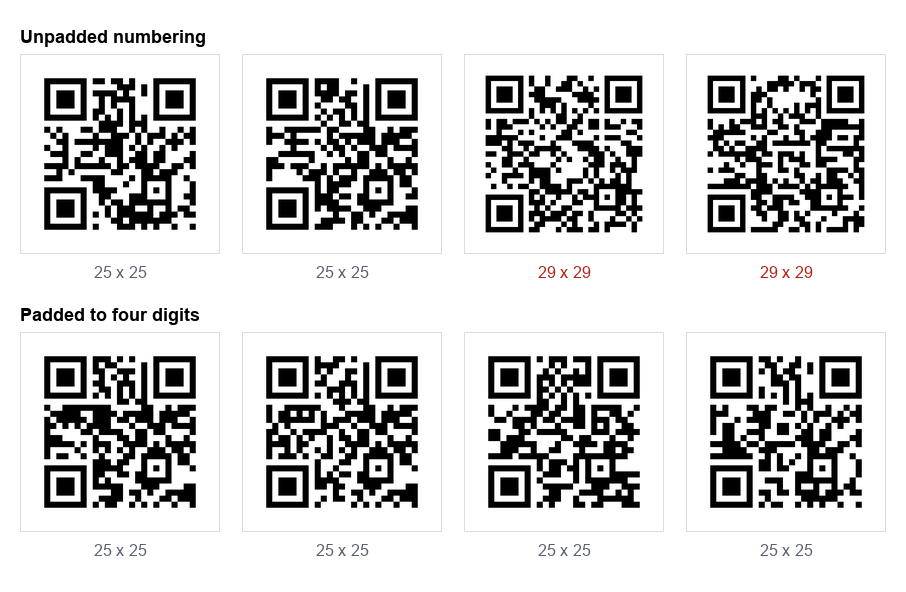
| URL | Chars | Grid |
|---|---|---|
https://example.com/t/1 | 23 | 25 x 25 |
https://example.com/t/9999 | 26 | 25 x 25 |
https://example.com/t/10000 | 27 | 29 x 29 |
https://example.com/t/20000 | 27 | 29 x 29 |
One extra digit and the grid grows by 16%. Print that batch at a fixed 20 mm square and the codes after 9999 have visibly smaller modules than the ones before it, which means they scan less well in exactly the same conditions. Nobody notices until someone complains that "some of the table cards do not work".
The fix costs nothing. Pad your numbers to a fixed width before you generate. Use /t/0001 rather than /t/1. We regenerated the same 500 code batch with four digit padding and every single code came out 25 by 25, so a single print size works for the whole run.
The same logic applies to any varying field, not just numbers. If half your codes carry a short product name and half carry a long one, the batch will not be uniform. Decide the longest value first and check that one.
The characters that break a batch
We ran a list of awkward inputs through our own bulk tool to see what survived a round trip. Most things did. Commas, quotes, ampersands in query strings, semicolons, backslashes and a 200 character URL all came back exactly as they went in.
Two things did not, and both are worth knowing about whatever tool you use:
- Characters outside plain ASCII. Accented names, non Latin scripts and emoji are encoded as multiple bytes, and a generator that assumes one character is one byte will mangle them. This is not theoretical: it was true of our own tool until this test found it, and it is why we now encode as UTF-8 everywhere and say so.
- Leading and trailing spaces. A stray space copied from a spreadsheet becomes part of the data. Most tools trim it, ours included, but not all do, and a URL with a space in front of it will not open.
If your list contains a single accented name, generate that one first and decode it before running the other 499.
Verify the whole batch, not a sample
The usual quality check on a batch is to scan two or three codes with a phone and assume the rest are fine. That catches a broken generator. It does not catch the error that actually happens, which is a row being wrong in the source list.
A wrong row produces a perfectly valid QR code pointing at the wrong thing. It scans beautifully. You find out when a customer lands on table 47's menu at table 12.
The check that catches it is to decode every image and compare the result against the line it came from. That is what we do to our own generators before publishing anything, and it is the only reason we trust the numbers in these articles. If you are producing a batch for a client, it is worth the twenty minutes.
For a single code, our scanner shows you exactly what is inside before you commit, and the stress test shows how much abuse it tolerates.
Naming the files so the printer can use them
A folder of 500 files called qr-code.png, qr-code-1.png and so on is a problem for whoever has to lay them out. Useful names:
- Name each file after the thing it identifies, not its position in the list.
table-0012.svgbeatscode-12.svg, because the layout person can match it to the artwork without counting. - Pad the numbers here too, so files sort correctly. Without padding, most systems sort 10 before 2.
- Avoid spaces and punctuation in file names. They survive a zip but not always a design tool's import.
- Keep the source list with the folder. When someone later asks which code went on which card, the list is the answer and it is always lost.
Our bulk generator names files from the content of each line and exports the batch as a zip of SVGs, a zip of PNGs, or a PDF sheet for printing directly, including label sheets in Avery 5160 and 5163 sizes.
Common questions
Is my list uploaded anywhere?
No. The codes are generated in your browser and the ZIP and PDF are assembled there too. Nothing you paste reaches a server, ours or anyone else's. That matters when the list contains customer references or internal asset IDs.
Can I generate WiFi or vCard codes in bulk?
Yes, if you build the payload yourself. Paste the raw format, for example WIFI:T:WPA;S:Network;P:password;;, one per line. The single purpose tools are easier for one offs, this is for volume.
Why is one code bigger than another?
Longer data needs more modules. A short URL might be a 25 x 25 grid where a long one is 49 x 49. They print at the same physical size, but the denser one has smaller modules and needs more care. Mixing very short and very long items in one batch means the codes will not all behave the same.
Can I change the colour?
Not here, deliberately. Coloured codes scan less reliably, and in a batch of a hundred that failure rate compounds. If you need brand colours, edit the SVG files afterwards and test the result.
Related tools
For a single code, the dedicated tools give you a proper form and guidance: WiFi, vCard, URL, text, phone, calendar, location and social.
Before you send a batch to a printer, it is worth reading what we found generating 500 of them: unpadded numbering makes codes change size partway through a run, SVG is less than half the weight of a print resolution PNG, and one wrong row produces a perfect code pointing at the wrong thing. It is all in bulk QR codes for a print run.