A review code works when it skips every step between "I liked this" and the star rating. The link you get from Google opens your listing with the review box already open, so a happy customer is one tap from writing. This page makes that code, and the guide below covers getting the right link, where to put the code, and the rules Google enforces.
Step 1: Get your direct review link
You need the link that opens the review form itself, not your business listing. There are two reliable ways to find it.
From your Google Business Profile
- Sign in to your Google Business Profile and select the location.
- Look for Ask for reviews or Get more reviews.
- Copy the short link it gives you. It usually looks like
g.page/r/...followed by a code.
From Google Maps
Find your business on Google Maps, open the listing, choose Share, and copy the link. This gives you a listing link rather than a review link, workable, but it adds a tap. The Business Profile route is better because it lands the customer straight on the star selector.
Test the link before you print anything. Open it on a phone that is signed into a different Google account than yours. You should see the review box with stars, not your business dashboard. If you see a management screen, you copied the wrong link.
Finding your Google Place ID
A Place ID is Google's permanent identifier for your business listing. Using it means the code opens the write a review box directly rather than dropping someone on your listing to hunt for the button.
- Open Google's Place ID Finder.
- Search for your business name and address.
- Click the result. The Place ID appears in a small box, starting with
ChIJ. - Copy it and paste it above.
If you already have a short review link from your Google Business Profile, paste that in the second box instead and we will use it as it is. Both work. The Place ID route is more reliable because short links have changed format before.
Step 2: Make the code on this page
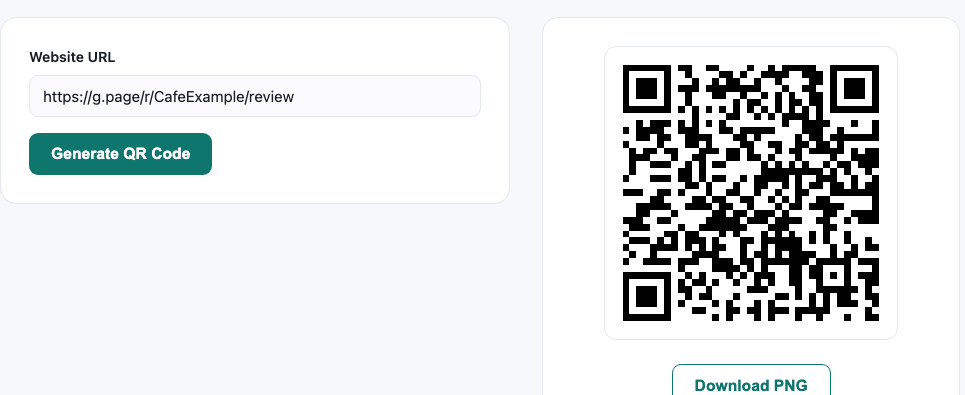
Paste the review link into the box above. The code is drawn in your browser and checked for print size as you type. Two things matter:
- Use the short g.page link if you have it. Shorter data means a simpler pattern that scans more reliably at the small sizes used on receipts and counter cards.
- Keep it static. Your review link does not change, so there is no reason to route it through a service that could stop working when a plan ends. Every code made here holds the link itself and never expires.
Then press Make a printable sign under the code: the sign maker opens with your review code already in it.
Step 3: Put it where the good feeling is
Placement matters more than design here, and the principle is simple: ask when the experience has just gone well, not before it has happened.
| Placement | Why it works | Size |
|---|---|---|
| At the till, facing the customer | The moment of payment, after the service is complete | 4 to 5cm |
| On the receipt | Goes home with them; they scan later when they have time | 2.5 to 3cm |
| On the payment tray or card machine | Unavoidable eye contact while they wait for the terminal | 3 to 4cm |
| On a thank you card in a delivery | Arrives with the product, at the point of satisfaction | 3cm |
| In a follow up email or invoice | Free, reusable, no printing | 150px on screen |
What does not work: a code on the table at the start of a meal, a code on the door on the way in, or a code buried on a menu page. The customer has nothing to say yet.
Step 4: Write the right words next to it
An unlabelled QR code gets ignored. The text beside it does most of the persuading, and the wording is where businesses most often break Google's rules without realising.
Good examples:
- "Enjoyed your visit? Scan to leave us a review. It takes 30 seconds."
- "We're a small team. A review really helps."
- "Tell us how we did."
Avoid:
- "Leave us a 5 star review", soliciting a specific rating is against Google's policy.
- "Scan for 10% off your next visit", incentivising reviews is prohibited and can get reviews removed or the listing penalised.
- Anything that suggests only happy customers should scan, review gating is explicitly against the rules.
The line that matters: you may ask for a review. You may not ask for a good review, offer anything in exchange, or filter who gets asked. Google enforces this, and the penalty falls on your listing rather than the customer.
Why review gating is a trap
A common setup is to send customers to a page that asks "How was your visit?", sending happy ones to Google and unhappy ones to a private feedback form. Vendors still sell this. It violates Google's review policies, which prohibit both incentivised reviews and selectively soliciting only positive ones.
Beyond the rules, it rarely works as intended. A perfect five star average with no critical reviews can also read as suspicious. A rating slightly below five, with reviews that describe specifics, tends to look more like a real business than a flawless record with nothing to say.
What Google does not allow
This is the part that gets businesses in trouble, and it is worth reading before you print anything.
- No incentives. Offering a discount, a free coffee or an entry into a draw in exchange for a review is against Google's policy. Reviews obtained that way can be removed and the listing can be penalised.
- No asking for five stars. Soliciting a specific rating is prohibited. "Leave us a review" is fine. "Leave us a 5 star review" is not.
- No filtering by sentiment. Screening people so that only the happy ones reach the review form is called review gating and it breaches the policy.
The safe wording next to the code is plain: "Scan to leave a review" or "Tell us how we did". Our guide to review codes goes through the placement and wording in more detail.
When to ask
Timing beats wording. Nobody leaves a review because the sign was well designed. They leave one because they were asked at a moment when they felt good and had thirty seconds spare.
- At the counter, after payment. The service is finished and they are standing still. This is the best moment in most businesses.
- On the receipt, which goes home with them. Lower response rate, but it reaches people who were in a hurry.
- In the delivery box or with the finished work. For anything where the good moment happens after they have left.
- Not while they are waiting. A code on a waiting room wall asks for a review before the service has happened, which produces nothing.
Print the code at 4 to 5 cm at a counter, and pair it with one sentence saying what it does. A bare code gets scanned far less, because people avoid scanning things when they cannot predict where they will land.
What to expect
Realistic numbers, so you can tell whether it is working:
- A well placed counter code typically converts a small single digit percentage of customers. That sounds low until you compare it with the near zero baseline of hoping people remember.
- Reviews arrive in bursts rather than steadily, busy days produce clusters.
- Mentioning it verbally roughly doubles the scan rate compared with the code sitting there silently. "If you have a second, the code on the counter really helps us" is enough.
Handling the reviews you get
Collecting reviews is half the job; responding is the half that affects how the listing performs.
- Reply to every review: positive and negative. Google's own guidance says responding to reviews shows you value them, and it is visible to everyone reading later.
- Answer criticism factually, not defensively. Future customers are reading your reply more closely than the complaint.
- Never argue. A calm, specific reply to a harsh review often reads better than the review itself.
- Report only genuine policy violations: fake reviews, spam, or content about a different business. Disagreement is not grounds for removal.
Troubleshooting
The code opens the listing, not the review box
You used the Maps share link rather than the Business Profile review link. Go back to your Business Profile and use the "Ask for reviews" link.
Customers say they scanned but nothing happened
Usually a print problem rather than a link problem: too small, low contrast, or glossy lamination reflecting the light. Our print sizing guide covers the fixes.
Reviews appear and then disappear
Google filters reviews it considers suspicious. Common triggers are several reviews from the same IP address (for example, customers using your own guest WiFi), or a sudden spike after months of nothing. Both resolve with steady, organic collection.
The link works for me but not for customers
Test while signed out or in a private window. Your own account sees an owner view that customers do not.
Want private feedback instead?
A Google review is public and carries the customer's name. For honest comments you can act on quietly, make a Google Form code or an email code. Offer them to everyone, not only to unhappy customers, so you stay clear of review gating.
Common questions
Does the customer need a Google account?
To leave a Google review, yes. Most people on Android are signed in already, and many iPhone users are too. If a meaningful part of your customers will not have one, the form or email options avoid that barrier entirely.
Can I collect feedback anonymously?
A form can be anonymous if you build it that way. Email cannot, because their address comes with it. Google reviews are public and carry a name. Choose based on how candid you want people to feel.
Why does my email code look denser than the others?
Because it carries the address, the subject and the message, and the subject and body are percent encoded, which inflates them. Shorten the opening line, or drop it. The review and form codes are usually much sparser because they are a single link. You can compare them with our stress test.
Can I change where it points after printing?
Not on a static code, which is what this makes. If your form URL may change, point the code at a short page on your own site and redirect from there. Our static and dynamic guide covers when that is worth the effort.
Nobody is scanning it. What is wrong?
Usually placement and wording rather than the code. Check that it is at eye level at the moment the service ends, that it says what it does, and that it is large enough for the distance. If you suspect the code itself, our scan limits test found that focus, not size, breaks most real scans.